Configuration Manual
Purpose
This guide explains how StableSteering configuration works today, with a focus on the prompt-first session setup flow.
It is the reference document for:
- per-session YAML configuration in the HTML setup page
- how YAML maps to backend
StrategyConfigvalues - which parameters affect generation, steering, and feedback behavior
- how to safely edit, reset, and validate session config
For the shortest run path, see quick_start.md. For the code-level view, see developer_guide.md. For the user-facing workflow, see user_guide.md.
Where Configuration Lives
StableSteering currently uses configuration at two different levels.
1. Runtime Environment Configuration
This controls how the app process runs. Examples include:
- active backend
- GPU/device policy
- model location
- filesystem roots
These values are loaded from application settings in the backend and are not the same as per-session strategy choices.
Relevant code:
2. Per-Session Strategy Configuration
This controls how one user session behaves. Examples include:
- sampler
- updater
- feedback mode
- candidate count
- image size
- trust radius
These values are edited as YAML in the setup page and are parsed into StrategyConfig for each new session.
Relevant code:
Session Setup Flow
The current setup flow is:
- open
/setup - enter the user text prompt
- optionally edit the negative prompt
- edit the YAML strategy block
- submit the setup form
- backend validates the YAML and creates: - an experiment - a session linked to that experiment
- browser opens the new session view
The YAML block is reloaded fresh from the backend template when:
- the setup page is rendered
- the user clicks
Reload default YAML
That makes each session configuration explicit and editable instead of being spread across several independent form controls.
Setup Endpoints
The setup page now uses these routes:
-
GET /setupRenders the HTML page and injects the default YAML template. -
GET /setup/config-templateReturns the canonical default YAML as JSON. -
POST /setup/sessionAccepts prompt fields plusconfig_yaml, validates the YAML, creates the experiment, then creates the session.
This means the YAML document is the source of truth for per-session strategy configuration.
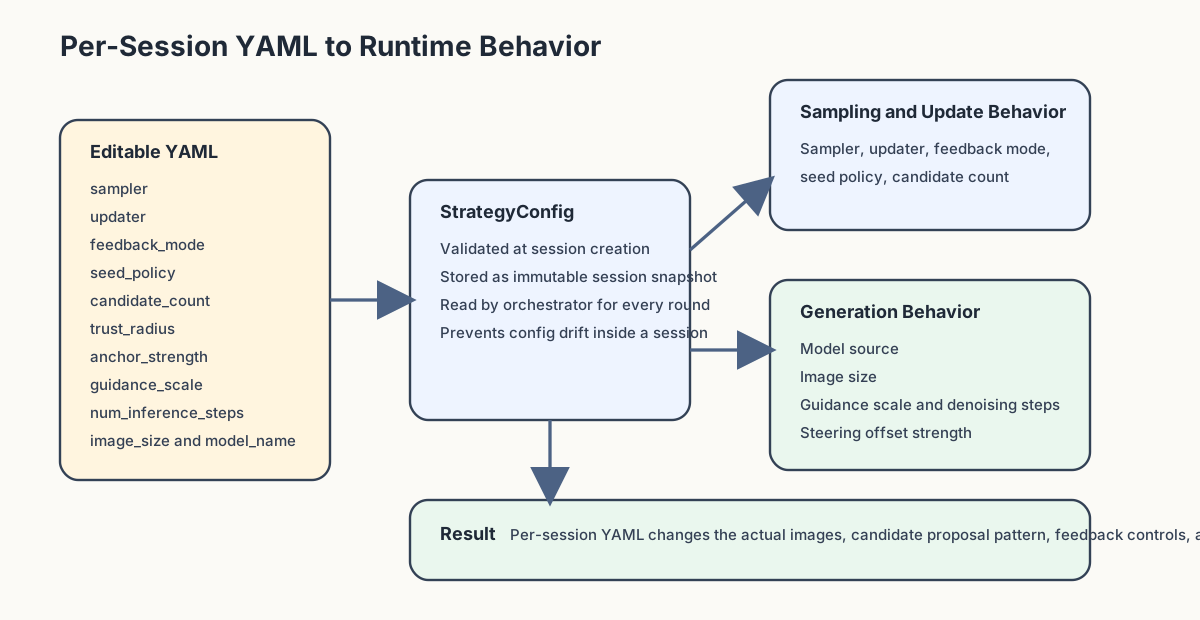
YAML Template
The setup page starts from a backend-generated YAML document similar to this:
sampler: exploit_orthogonal
updater: winner_average
feedback_mode: scalar_rating
seed_policy: fixed-per-candidate
steering_mode: low_dimensional
steering_dimension: 5
candidate_count: 5
image_size: 512x512
trust_radius: 0.55
anchor_strength: 0.7
guidance_scale: 7.5
num_inference_steps: 15
model_name: runwayml/stable-diffusion-v1-5
The exact default text is rendered by:
Parameter Reference
sampler
Controls how candidate steering vectors are proposed for a round.
Supported values:
random_localexploit_orthogonaluncertainty_guidedaxis_sweepincumbent_mix
Effect:
- changes how exploration behaves around the current steering state
- changes the balance between exploitation and diversity
Related code:
updater
Controls how user feedback updates the incumbent steering state.
Supported values:
winner_averagewinner_copylinear_preference
Effect:
- determines how aggressively the system moves toward the selected winner
Related code:
feedback_mode
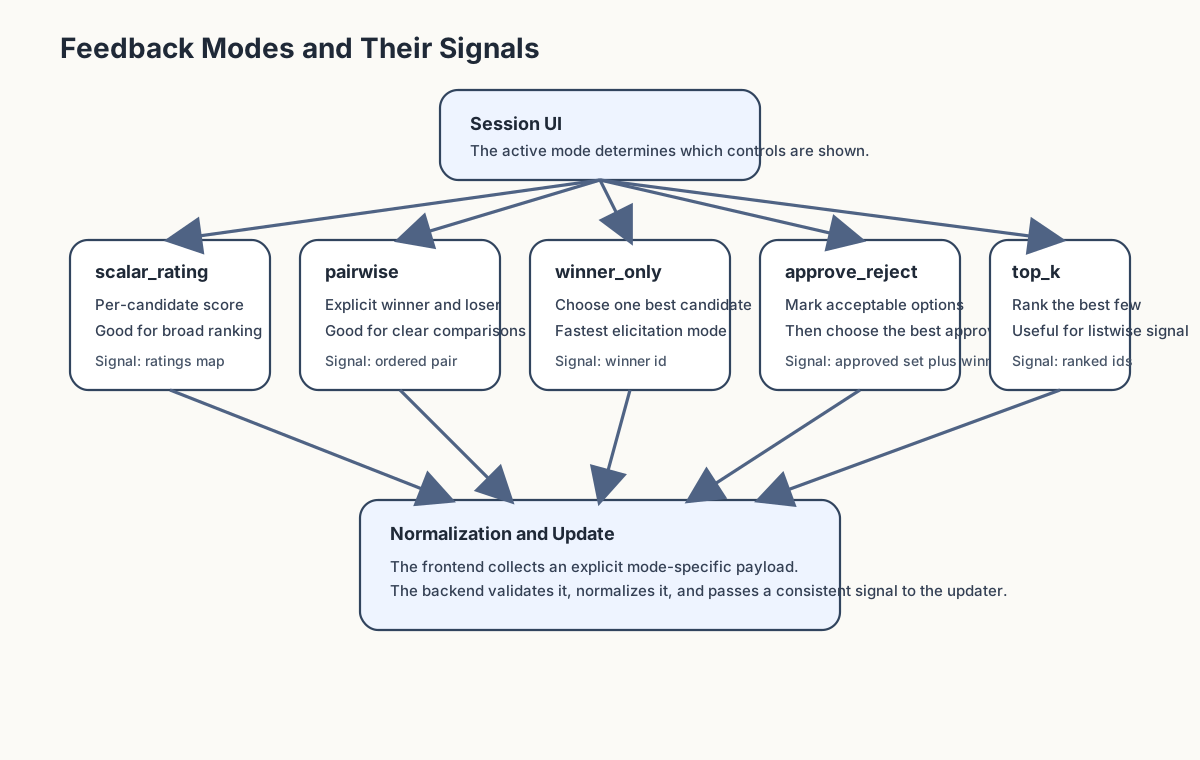
Controls how the UI feedback payload is interpreted.
Supported values:
scalar_ratingpairwisetop_kwinner_onlyapprove_reject
Effect:
- changes which session controls the frontend renders
- changes how the browser collects explicit user preference signals before normalization
Related code:
seed_policy
Controls how seeds are assigned across rounds.
Current value used by the MVP:
fixed-per-roundfixed-per-candidatefixed-per-candidate-role
Effect:
-
fixed-per-roundAll newly rendered candidates in the round share one seed. This is the cleanest way to reduce within-round seed noise. -
fixed-per-candidateEach visible candidate position gets its own deterministic seed. This increases variation inside a batch. -
fixed-per-candidate-roleCandidates with the same sampler role share one deterministic seed, while different roles get different seeds. This is useful when the sampler uses meaningful roles such asexplore,refine,challenger, orvalidation.
Notes:
- round 1 baseline prompt and later carried-forward incumbents still participate in the policy metadata
- carried-forward incumbents preserve the original winning image and seed rather than being re-rendered under a new seed
- all policies are deterministic for the same session and round inputs
steering_mode
Describes the steering representation family.
Current value used by the MVP:
low_dimensional
Effect:
- selects the steering representation contract used by generation
- generation now explicitly routes through the
low_dimensionalsteering path and rejects unsupported modes during rendering
steering_dimension
Controls the size of the low-dimensional steering vector for the session.
Typical values:
358
Effect:
- changes the length of the session steering vector
current_z - changes the dimensionality samplers use when proposing candidate directions
- changes the baseline and incumbent vector length in replay, traces, and session state
Notes:
- this is a per-session YAML setting
- the current implementation still uses
low_dimensionalsteering mode, but the dimension inside that mode is now configurable
candidate_count
Controls how many candidates are shown per round.
Typical values:
345
Current round policy:
- round 1 includes the unmodified prompt baseline as candidate
0 - later rounds include the previous round winner as candidate
0 - remaining candidates come from the sampler
This means candidate_count is the total visible batch size, not the number of newly sampled alternatives.
image_size
Controls the rendered image size.
Format:
WIDTHxHEIGHT
Examples:
512x512768x512
Notes:
- the current real Diffusers path parses this string directly
- poor-quality settings can hurt output quality, especially with SD 1.5
trust_radius
Controls how far the sampler is allowed to move from the current steering state.
Effect:
- larger values increase exploration
- smaller values keep proposals closer to the incumbent direction
anchor_strength
Controls how strongly the latent steering vector perturbs the encoded prompt embedding.
Effect:
- larger values make candidate steering offsets more pronounced
- smaller values keep steered candidates closer to the raw prompt embedding
- this now directly affects Diffusers prompt-embedding steering and is persisted in candidate generation metadata
guidance_scale
Controls classifier-free guidance strength during image generation.
Effect:
- larger values usually push images to follow the prompt more literally
- smaller values allow looser, sometimes more varied interpretation
- this now directly affects both real Diffusers rendering and mock trace artifacts
num_inference_steps
Controls how many denoising steps the diffusion pipeline runs per image.
Effect:
- larger values typically improve quality and prompt faithfulness at the cost of latency
- smaller values are faster but can degrade image quality or stability
- this now directly affects both real Diffusers rendering and mock trace artifacts
model_name
Selects the model checkpoint for the session.
Current default:
runwayml/stable-diffusion-v1-5
Important note:
- if a prepared local model matching this Hugging Face id exists, the real backend loads and caches that model for the session
- if the model is missing, session generation fails clearly instead of silently ignoring the setting
- this field now directly affects the real generation backend and is stored in candidate generation metadata
Validation Rules
The YAML editor is flexible, but it is not free-form.
The backend validates the YAML against StrategyConfig.
Validation happens in:
Current validation behavior:
- invalid YAML syntax is rejected
- non-mapping YAML is rejected
- missing required structure falls back only where
StrategyConfigdefines defaults - invalid enum-like values are rejected by schema validation
- invalid numeric types are rejected by schema validation
If validation fails, the setup request returns a structured API error.
Practical Editing Guidance
Good workflow:
- start from the default YAML
- change one or two parameters at a time
- create a session
- observe the session behavior
- compare the resulting trace report and replay
Recommended beginner changes:
- switch
sampler - switch
updater - change
candidate_countfrom4to3or5 - increase or decrease
trust_radius
Changes to make carefully:
- unusual
image_size - very large
candidate_count - combinations that make comparisons harder rather than easier
Relationship To Runtime Settings
Per-session YAML does not override every backend runtime rule.
Examples of process-level rules that still apply:
- GPU-only real Diffusers runtime by default
- no silent fallback to the mock backend
- model preparation requirements
- trace and artifact storage locations
So the session YAML controls the strategy of the run, while the app settings control the environment in which the run is executed.
Example Configurations
Conservative Comparison Session
sampler: random_local
updater: winner_average
feedback_mode: scalar_rating
seed_policy: fixed-per-round
steering_mode: low_dimensional
candidate_count: 5
image_size: 512x512
trust_radius: 0.25
anchor_strength: 0.35
guidance_scale: 7.0
num_inference_steps: 20
model_name: runwayml/stable-diffusion-v1-5
Use this when:
- you want stable nearby comparisons
- you want smoother updates between rounds
More Exploratory Session
sampler: uncertainty_guided
updater: linear_preference
feedback_mode: scalar_rating
seed_policy: fixed-per-round
steering_mode: low_dimensional
candidate_count: 5
image_size: 512x512
trust_radius: 0.4
anchor_strength: 0.45
guidance_scale: 7.5
num_inference_steps: 24
model_name: runwayml/stable-diffusion-v1-5
Use this when:
- you want broader exploration around the current direction
- you want stronger movement after feedback
Pairwise Preference Session
sampler: exploit_orthogonal
updater: winner_copy
feedback_mode: pairwise
seed_policy: fixed-per-round
steering_mode: low_dimensional
candidate_count: 3
image_size: 512x512
trust_radius: 0.3
anchor_strength: 0.35
guidance_scale: 8.0
num_inference_steps: 20
model_name: runwayml/stable-diffusion-v1-5
Use this when:
- you want sharper A/B-style comparisons
- you want the winner to become the new incumbent exactly
Axis Sweep Ranking Session
sampler: axis_sweep
updater: linear_preference
feedback_mode: top_k
seed_policy: fixed-per-round
steering_mode: low_dimensional
candidate_count: 5
image_size: 512x512
trust_radius: 0.34
anchor_strength: 0.4
guidance_scale: 7.5
num_inference_steps: 22
model_name: runwayml/stable-diffusion-v1-5
Use this when:
- you want more interpretable positive/negative axis probes
- you want to rank the full batch rather than select only one winner
Approve / Reject Session
sampler: incumbent_mix
updater: winner_average
feedback_mode: approve_reject
seed_policy: fixed-per-round
steering_mode: low_dimensional
candidate_count: 5
image_size: 512x512
trust_radius: 0.3
anchor_strength: 0.35
guidance_scale: 7.2
num_inference_steps: 18
model_name: runwayml/stable-diffusion-v1-5
Use this when:
- you want to quickly mark acceptable vs unacceptable options
- you still want one approved candidate to become the update target